
🎨 Mock Design
🧪 User Testing
📊 Research Report
♿ Accessibility Compliance
Overview
Users on a major health fintech platform were cycling between B2B and B2C pages, unable to self-identify which content was meant for them. I led a full navigation redesign, from benchmark tree testing to accessibility-compliant mocks, resulting in a 68.5% lift in B2C task success and 39% in B2B.
Impact
68.5%
39%
Role
Product Designer & UX Researcher
Client
Undisclosed Company
Year
2024
Disclaimer: This case study has been anonymized to adhere to NDA guidelines.
The Problem
We regularly conducted reports for a major health fintech to observe overall performance and additions for certain key product and informational pages, in most cases these pages are tailored to either B2B or B2C audiences. In some of these reports, there were instances observed through both Hotjar and Google Analytics that showed users were cycling through both B2B and B2C pages for the same product, indicating that users seemed unsure as to which page was appropriate for them. This self identification issue continued to be persistent as the client's site continued to grow.
While optimizations were made to the content across the site to better inform users if pages were B2B or B2C orientated, the site's information architecture and navigation was lacking in its ability to help users better navigate the site as a whole. This led to the start of the mega-menu project and determining its potential to create a better site experience.
The Opportunities
While self-identification was the clearest user problem, the opportunity was broader: improving findability across a growing site, reducing support burden, and creating a navigation model that better supports engagement and conversion.
Increase Findability
The client’s website is constantly growing, with over 130 pages. The new mega-menu layout can help with self-identification, increased categorization and the addition of descriptive copy for links. Other case studies have shown that a mega-menu optimization resulted in a 85% increase in findability.
Call Deflection
Reducing call center costs has been an ongoing goal driving various website changes and optimizations. With the mega-menu, if users can more easily find the content that is correct for them, it can help further reduce call volume.
Self Identification
Proper identification can propel improvements on content engagement, increase rates of returning users, improve login and/or account activation, and increase overall lead conversion
Increase Conversion
Proper identification can propel improvements on content engagement, increase rates of returning users, improve login and/or account activation, and increase overall lead conversion
SEO Improvements
In secondary research findings, it was observed that improving information architecture and evaluating it through a series of tree tests led to an average increase of around 20% in task success. This can also lead to lower bounce rates and longer dwell times for SEO. Additionally providing a clearer structure can help search engines better understand a site’s architecture, which can lead to improved page rankings.
The Process: Methodology
To understand how the current navigation was performing and where a mega menu could improve it, I started by evaluating the site’s information architecture through tree testing. An earlier usability test of an early mega-menu concept had already suggested that a revised navigation model could create a better experience, so this phase focused on validating that direction.
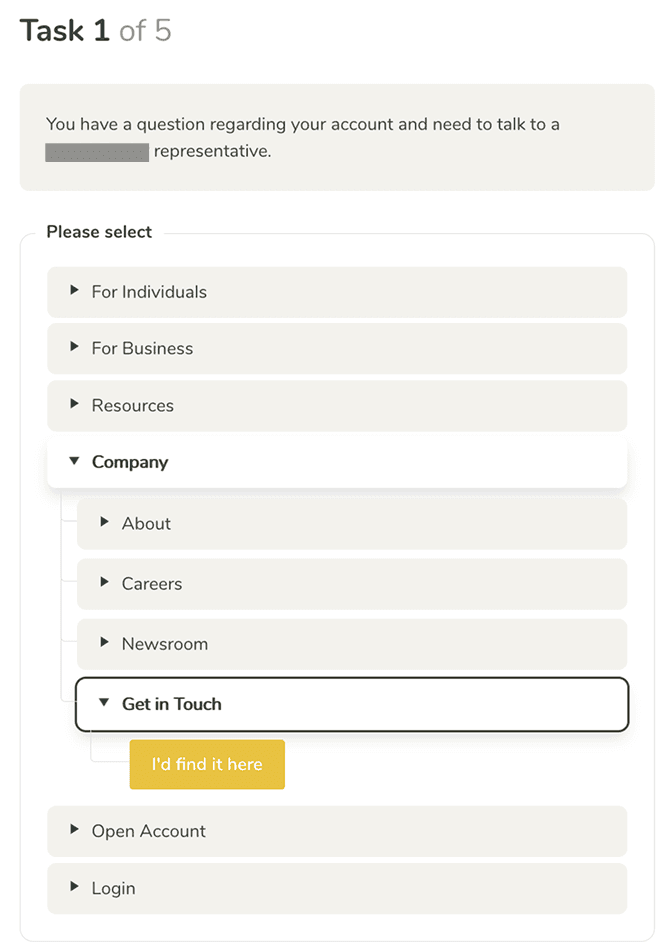
Using Tree Tests
Tree testing is a usability method used to evaluate how effectively users can find information based on a site’s information architecture.
Why Use This Method?
Because it removes visual design and interface cues, tree testing isolates the information architecture itself. This made it especially useful for measuring findability and understanding whether users could identify the right navigation path based on labels alone.
Success Rate Disclaimer
Since tree tests are intentionally stripped down, success rates are often lower than in full usability tests. Even so, they are highly effective for uncovering issues in hierarchy, labeling, and overall findability.
Tree Testing Interface
The Process: Testing Breakdown
I used tree testing to compare the existing navigation against a revised information architecture, measuring whether clearer labels and structure would improve findability before any visual design was applied.
The benchmark test established a baseline with 54 B2C users and 54 B2B users. Results showed low task success, along with repeated confusion around top-level labels, cross-audience exploration, and B2B users navigating through B2C paths to complete tasks.
Using those findings, I reworked the IA and tested the redesign with 51 B2C users and 53 B2B users using the same task sets and screening approach. Task success improved from 28.3% to 47.7% for B2C and from 24.6% to 34% for B2B, with B2B participants showing stronger confidence in the updated structure.
The Solution: Mega Menu Designs
I redesigned the navigation to reduce audience ambiguity, clarify subgroup distinctions, and make destination choices easier before click.
The benchmark tree test showed that users were confused by top-level labels, explored the opposite audience path, and often crossed between B2B and B2C routes to complete tasks.
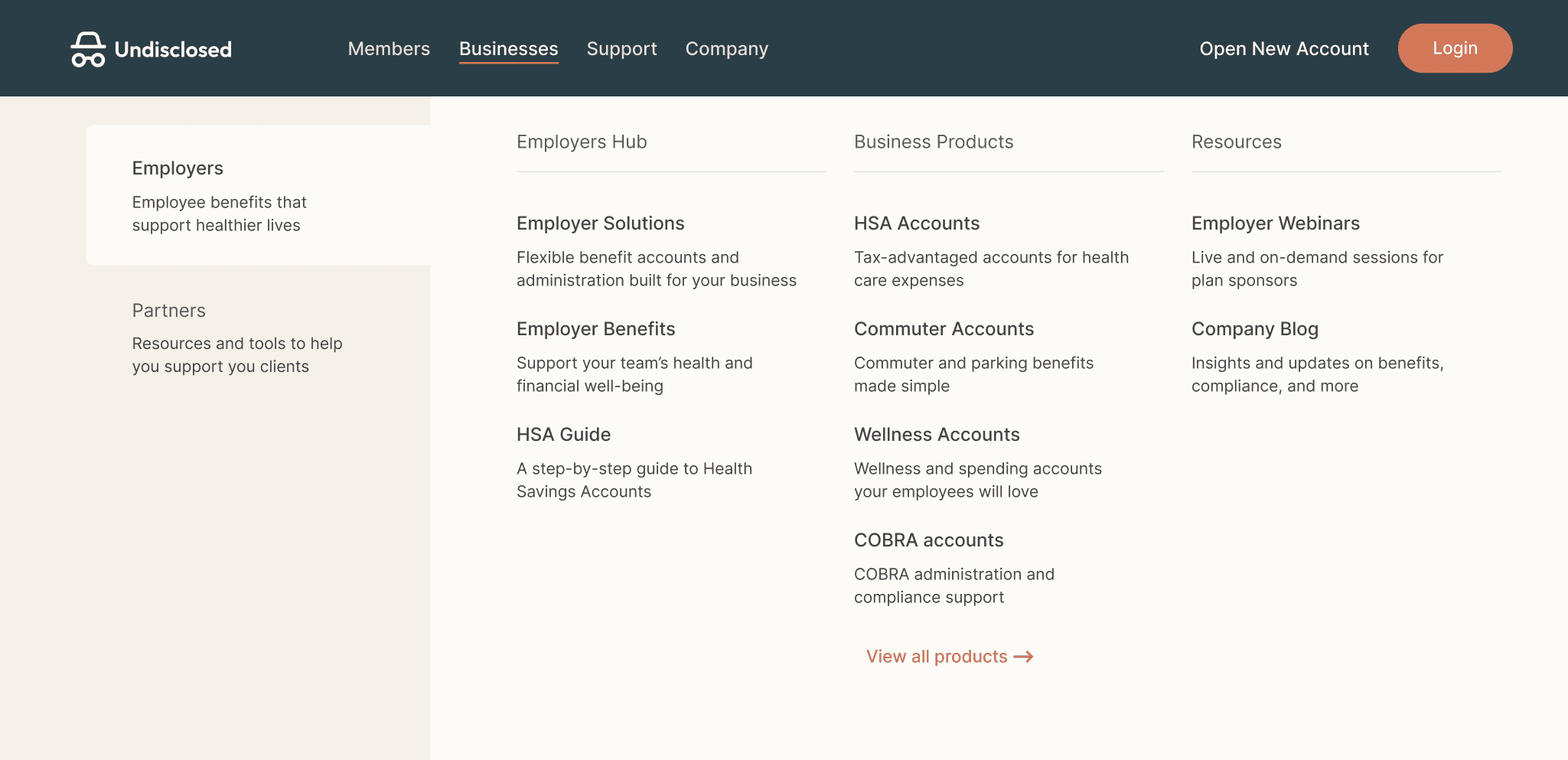
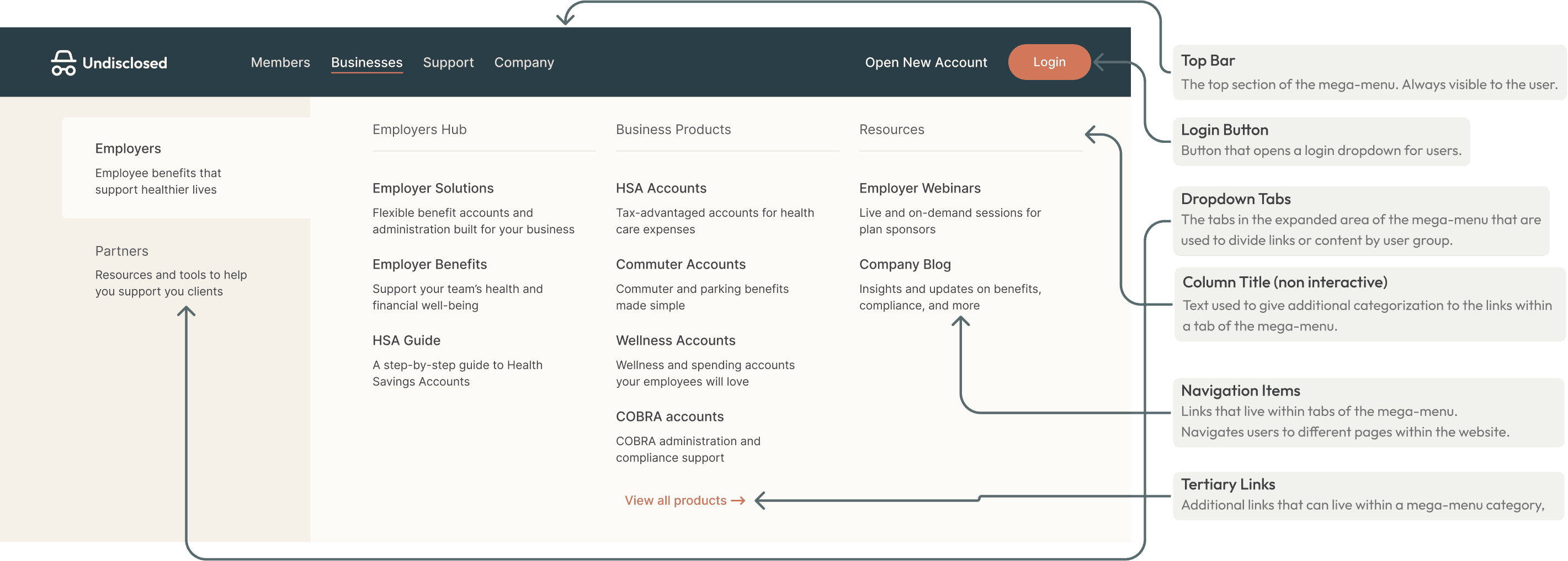
In response, I simplified the navigation into four top-level categories and introduced clearer audience-based subgrouping within the mega menu. “Members” and “Businesses” each use left-side tabs to separate subgroups like Employers and Partners, helping users identify the right path more quickly.
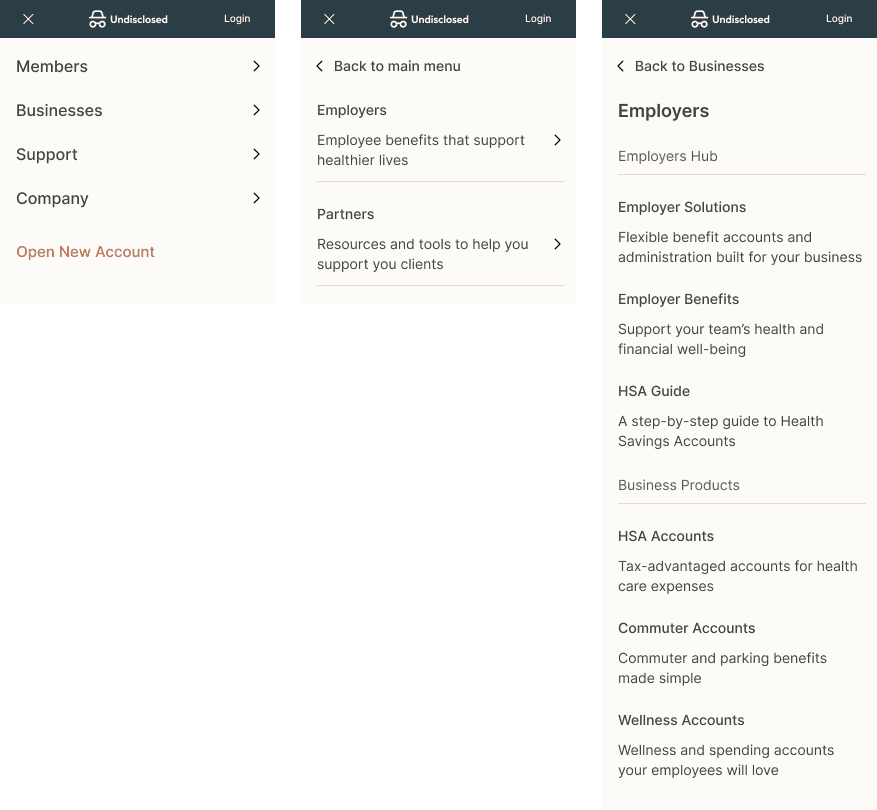
Links within each subgroup are further organized and paired with descriptive text to give users more context before selecting a destination. The mobile version follows the same logic, carrying the structure into a more compact format.
Conclusion & Wrap Up
After finalizing the mega-menu mocks, I packaged the full set of responsive screens for accessibility review. Because the navigation is a site-wide pattern, it was important to validate that it met WCAG AA expectations across layouts and interaction states.
For a large healthcare platform, accessibility was not just a compliance check. It was a core part of ensuring that the navigation was clearer, more usable, and more reliable for all users.

© Tomiya Jones - 2026
in