
🎨 Page Design
🧪 User Testing
📊 Research Report
🔍Heuristic Evaluation
Overview
Pet Insurance Quotes is a marketplace where pet owners compare insurance plans from leading providers. When our team took over the product, the quote funnel had received minimal investment and lacked the research foundation needed to understand what was or wasn’t working.
I led the redesign from audit through usability testing and final production design. The goal was to reduce friction, build trust, and help pet owners move from initial curiosity to a more confident quote decision.
Impact
6
3
Understanding the Problem
When we took over Pet Insurance Quotes, there was no analytics baseline, no prior research, and no record of design decisions. The site had been running with minimal updates, and the only thing we knew for certain was that the conversion funnel wasn't performing the way the business needed it to.
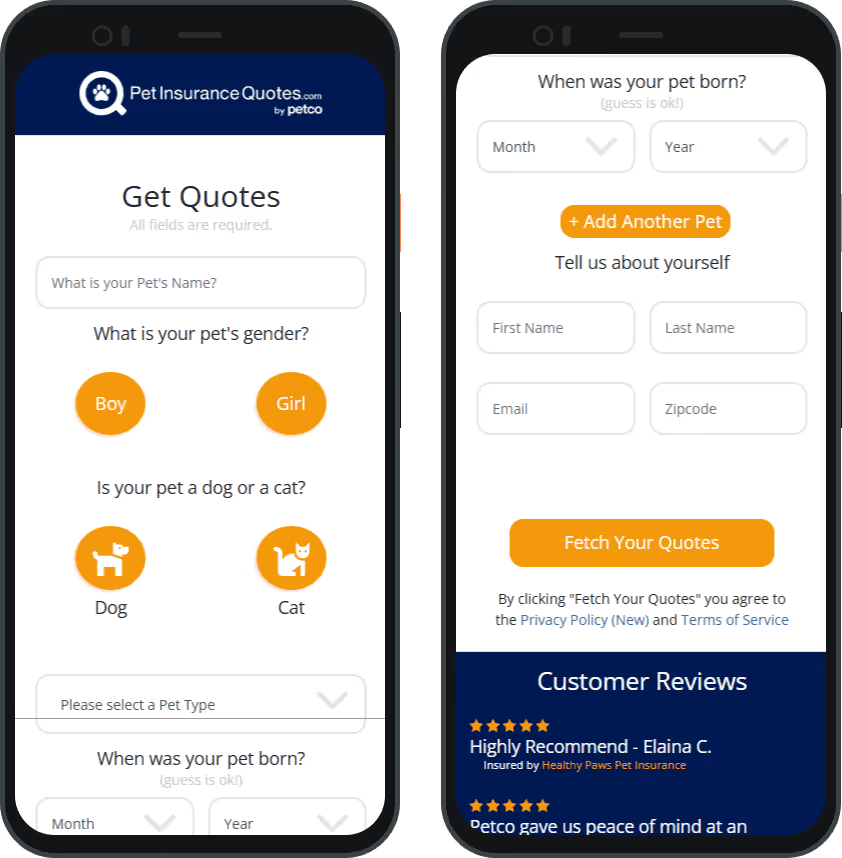
Without existing data to guide priorities, I started by auditing the experience myself. I walked through the full funnel as a user, documented every friction point I encountered, and mapped the issues into three categories.
The form experience created confusion instead of confidence. Pet-related and personal information fields were mixed together on a single page with no clear grouping or sense of progression. Field labels were vague ("Pet Type," "Zipcode") without context for why the information was needed. There were no interactive states on form fields or buttons, and the overall layout felt dated and inconsistent.
The visual design undermined trust. Beyond layout issues, the funnel failed WCAG color contrast standards on several elements, had no keyboard navigation support, and lacked the visual polish users expect from a site asking for personal information. For a product that's ultimately asking people to make a financial decision, this mattered.
The copy wasn't working hard enough. Labels and CTAs were generic rather than guiding. Working with our copywriter and SEO team, I flagged opportunities to clarify what each form step was asking for, strengthen the value proposition language, and integrate keywords the page was missing.
AUDIT OF THE OLD FUNNEL
Audit of the inherited funnel experience. No analytics or prior research existed, so I started with a hands-on evaluation.
1
Lack of Design Structure
2
Unclear Labeling
3
No Interactive States
4
Failed WCAG Color Contrast
Learning From the Market
Before creating the prototype, I reviewed pet insurance and quote comparison experiences to understand the conventions users were likely to expect when requesting a quote. I focused on how competitors introduced their value proposition, structured form fields, used trust cues, and made the first quote step feel easy to complete.
Those observations shaped the prototype direction in a few key ways. We kept the quote request focused on a single page, led with a clear headline and benefit bullets, used familiar form patterns, and added customer reviews below the form to support trust. The goal was to create a lightweight, market-aligned quote experience that felt simple enough to start and credible enough to complete.
This gave us a stronger foundation for usability testing. Instead of testing the legacy funnel as-is, we tested a more focused prototype to understand where users still needed clearer structure, stronger guidance, or a more natural information order.
Building a Research Prototype
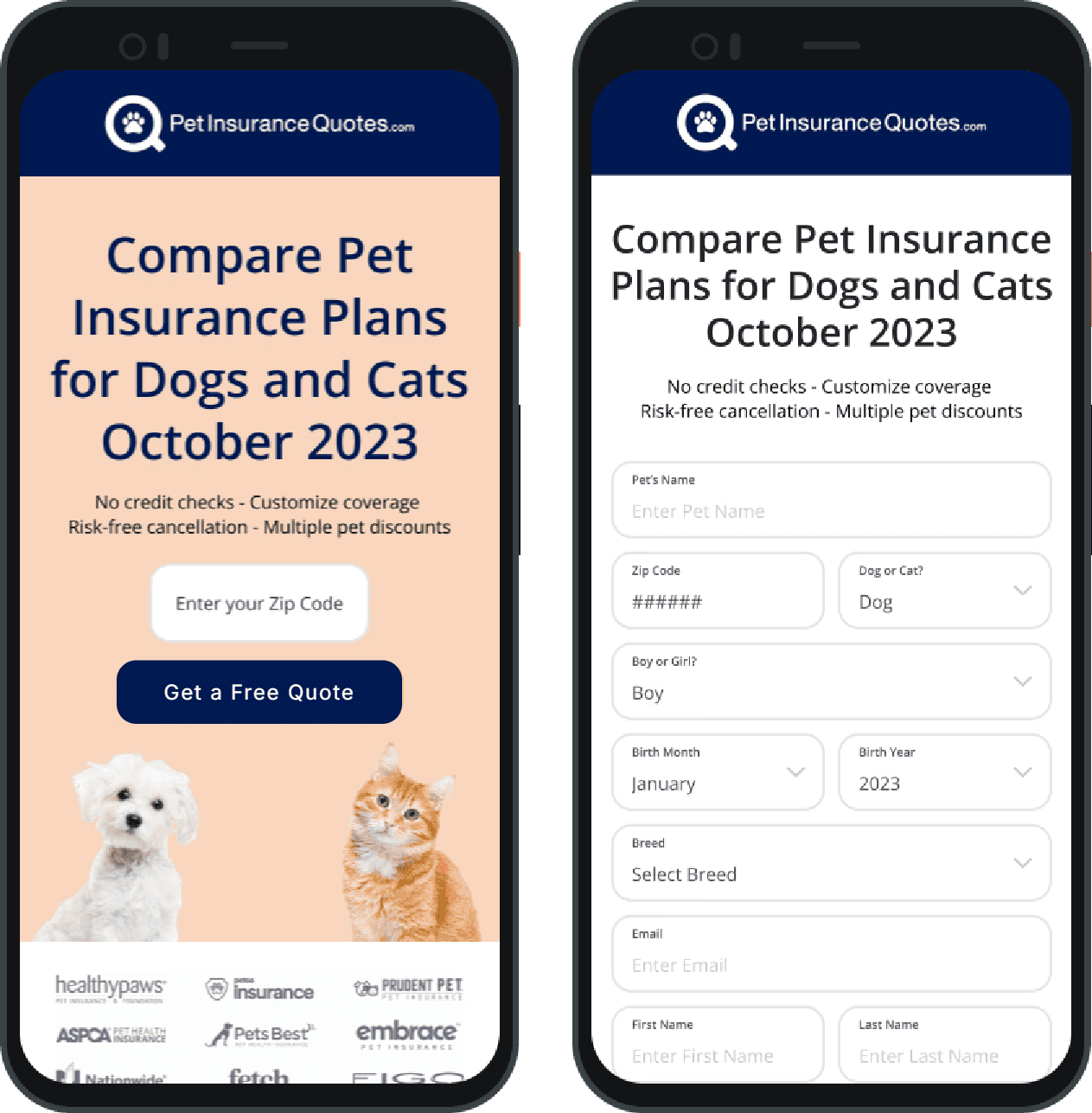
Our team wanted to validate design changes with real users before committing to a full production build. But rather than testing the old funnel and surfacing problems we already knew about, we took a more strategic approach: we designed a research prototype that incorporated our initial improvements, so testing would surface new, actionable insights rather than confirm obvious issues.
This prototype made targeted changes: reorganizing the form field structure, updating copy to align with our tone and SEO requirements, and applying foundational visual improvements from the design system I was simultaneously helping to build. It wasn't intended to be the final design. It was intended to be good enough to test against.
FUNNEL PROTOTYPE
Research prototype used for moderated usability testing, incorporating initial structural and content improvements.
What Users Told Us
I conducted 6 moderated usability tests over Zoom with participants who had either recently purchased pet insurance or were actively considering it for a pet under 2 years old, our target demographic. Each participant used a mobile staging link to complete the task of getting a quote for their pet, starting from the homepage. Sessions included pre-task questions about participants' familiarity with pet insurance, a think-aloud walkthrough, and post-task reflection.
Three findings shaped everything that came next.
The form felt like data collection, not a helpful tool. Participants were confused about why certain information was being requested. Several hesitated at the personal information fields, unsure whether they were committing to something or just exploring options. The lack of context around each field created friction at the exact moment users were deciding whether to trust the site.
People wanted to talk about their pet first, not themselves. Multiple participants reacted negatively to being asked for their name and email before entering any information about their pet. This ordering felt transactional, signaling that lead capture was the priority rather than helping them find the right coverage.
The results page was a wall of sameness. Once participants reached the quote results, they struggled to differentiate between providers. Cards were visually identical regardless of insurer. Without a recommended option, clear comparison points, or any hierarchy, most users felt overwhelmed and unsure how to choose. That said, participants consistently valued the ability to compare multiple quotes in one place, viewing it as the core promise of the product.
I'm not sure what quote to look at first
I don't know what a waiting period is.
WHAT WE HEARD & CHANGED
Mapping research findings to design changes, showing how each user pain point informed a specific funnel improvement.
Users confused by mixed form fields
Clarify copy so users know if a form is asking for pet or owner details
Users wanted pet-first,
not personal-first
Ensured the form starts with
pet details
Results felt identical and overwhelming
Added recommended badge, dynamic provider details, progressive disclosure
Turning Insights into Design Decisions
Armed with clear research findings, I redesigned the funnel to directly address each point of friction. Every major design change maps back to something users told us.
EVOLUTION OF THE FUNNEL
Progression from inherited funnel to research prototype to refined production design.
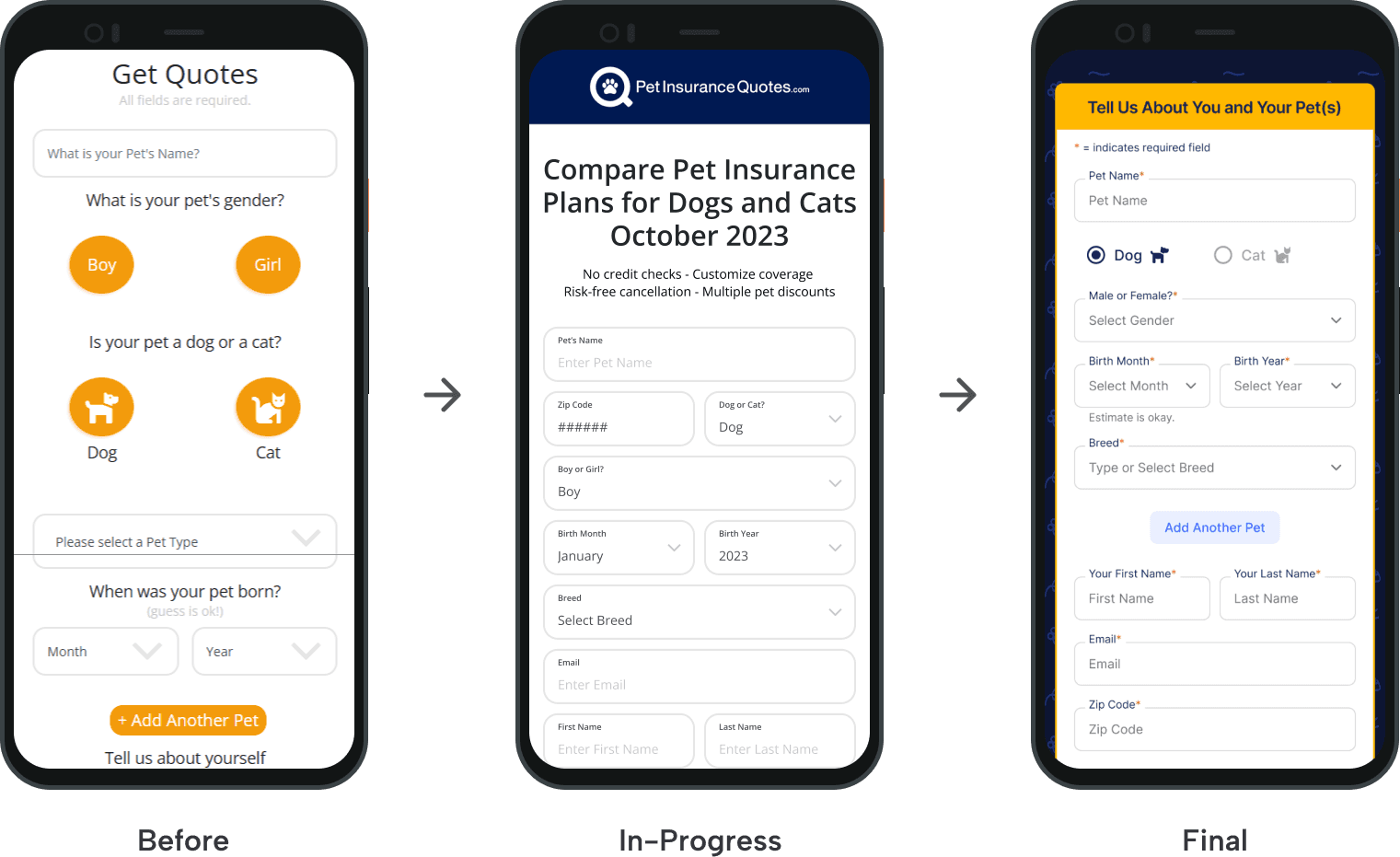
Restructured the form for clarity and to be pet first. We separated pet information from owner information into clearly labeled sections, with pet details coming first. Field labels were rewritten to explain more clearly what each field is requesting, reducing the "why are they asking me this?" hesitation that stalled users in the original flow.
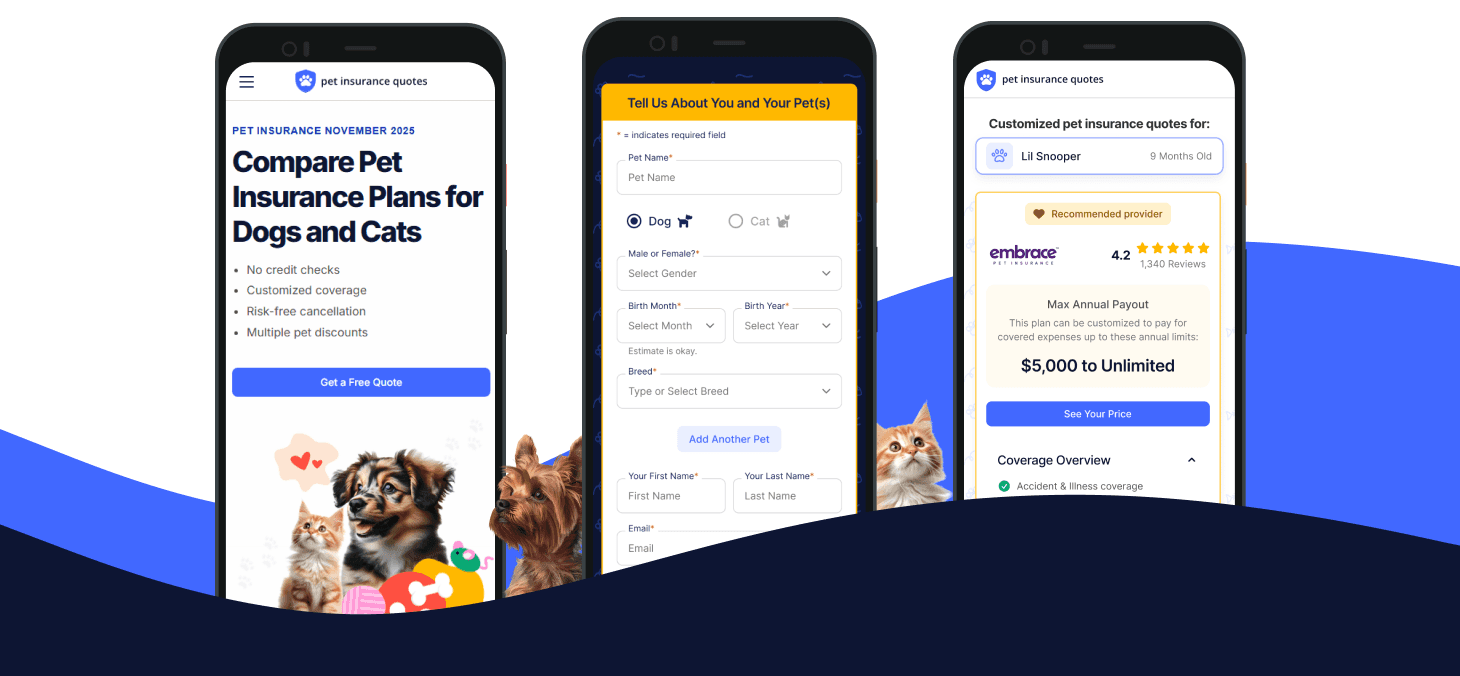
Redesigned the results page to guide decisions, not just display options. We introduced a "Recommended provider" badge on the top result to give users a clear starting point. Each quote card was redesigned to surface the most decision-relevant details upfront: provider rating, max annual payout, and a coverage overview. Additional details are accessible through expandable sections, reducing initial overwhelm without hiding information users need to make a confident choice.
Made comparisons meaningful with dynamic, provider-specific details. The previous results cards displayed identical layouts regardless of insurer. The redesigned cards pull in data unique to each provider, including specific coverage terms, waiting periods, and policy options, so users can make real comparisons without leaving the page. API limitations prevented us from displaying exact monthly or yearly costs from each provider, which we documented as a known gap for future iterations.
Final Design: Helping Users Compare With Confidence
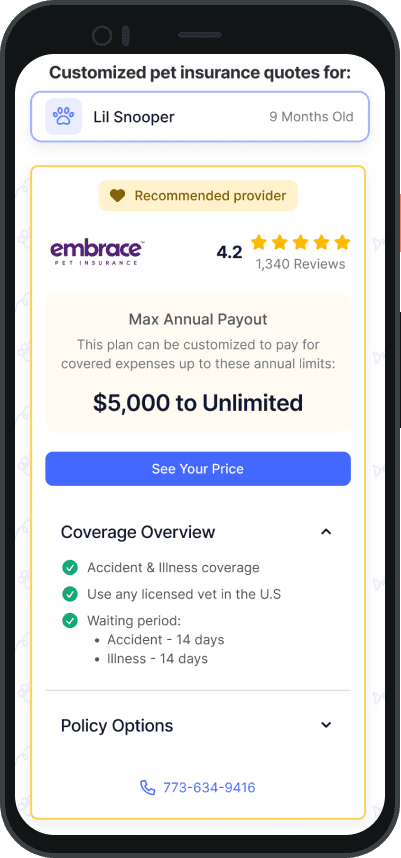
Confirm what the user submitted
Pet cards reassure users that quotes match the pets they entered.
Give users a clear starting point
The recommended provider treatment helps reduce decision paralysis.
Make comparison details easier to scan
Provider-specific payout, coverage, waiting period, and policy details help users evaluate tradeoffs.
Product constraints
Exact monthly/yearly pricing was not available through provider APIs, so the design emphasized the comparison details the system could reliably provide.
Reflections
This project reinforced how lightweight, focused research can de-risk product decisions when teams are working from limited data. Six moderated tests, conducted early enough to influence the build, helped us move from assumptions to specific design priorities: a pet-first form structure, clearer comparison hierarchy, and a more guided quote results experience.
Working within real constraints also shaped the outcome in productive ways. A tight timeline pushed us to be ruthless about scope. Limited development resources meant we had to prioritize the changes with the highest expected impact on conversion, like the form restructure and the recommended provider treatment, while deferring enhancements like tooltips on coverage terms for future iterations.
If I could do it again with more time and budget, I'd want to run a follow-up round of testing on the final shipped design to validate our post-launch metrics with qualitative data, and I'd push to expand the comparison experience with richer filtering and sorting tools on the results page.
Enter password to view case study
© Tomiya Jones - 2026
in